
Digital Printing Production KPIs: Measure First-Pass Yield, Downtime and Cost per Saleable Unit
Learn how Indian DTF, DTG, UV and sublimation print shops can measure first-pass yield, reprints, downtime and cost per accepted unit.

A digital printer can be busy all day and still deliver fewer saleable orders than a production team expected. Print speed is only one part of the job. Artwork correction, setup, waiting for materials, cleaning, curing, finishing, inspection, reprints and packing all consume capacity.
For an Indian print business running DTF, DTG, UV, UV DTF or sublimation equipment, a simple production scorecard can reveal where time and material are actually going. It does not require an expensive factory ERP. Start with a job ticket, a shift log and a consistent definition of an accepted product.
Why production measurement matters now
Recent Indian industry commentary points to the growing importance of workflow, automation and production efficiency.
In its 12 September 2026 Digital Printing Industry Pulse interview, PRESSIdeas reported Monotech Systems’ assessment that the overall Indian digital-printing market was broadly stable in the first half of FY 2026–27, while books, labels, packaging, industrial inkjet and digital embellishment showed areas of movement.
The interview also highlighted job preparation, workflow optimisation, scheduling, quality control and maintenance as practical automation opportunities.
In an 18 November 2026 interview published by Textile Insights, Orange O Tec discussed water use, on-demand production, application flexibility and responsive service as factors influencing technology decisions.
These are industry assessments and interviews, not a measured census of every Indian print shop.
The practical implication for an owner is straightforward: measure completed, accepted work—not just machine activity or advertised speed.
1. Start with a job ticket that follows the order
Give every production order a unique job number.
Record:
- Customer or internal order reference.
- Printing process and substrate.
- Artwork version and approved sample.
- Quantity and finished size.
- Machine and operator.
- Material batch, where relevant.
- Required delivery date.
Add timestamps for artwork-ready, machine-start, print-complete, finishing-complete, inspection and dispatch-ready.
Record pauses separately rather than hiding them inside a single production duration.
2. Track first-pass yield
First-pass yield tells you how much output passed the agreed quality check the first time, without reprinting or reworking it.
First-pass yield (%) = accepted units on first inspection ÷ total units first produced × 100.
Example: a shift prints 200 transfers. At first inspection, 184 meet the agreed standard and 16 need a reprint or correction.
First-pass yield is 92%.
This is an illustrative calculation, not an industry benchmark.
Define acceptance before production.
For DTF, that might include image completeness, white-underbase coverage, powder coverage and cured-transfer appearance, followed by the agreed press test.
For UV, check the intended surface, registration, adhesion and curing outcome.
For sublimation, inspect colour, placement, ghosting and the agreed fabric response.
The correct checklist depends on the application and equipment instructions.
3. Separate reprints from ordinary production
Record every reprint against its original job and assign a reason code.
Useful categories include:
- Artwork or file issue.
- Substrate defect.
- Operator setup.
- Material or consumable issue.
- Machine fault.
- Environmental condition.
- Finishing error.
- Customer-approved change.
Calculate:
Reprint rate = jobs or units reprinted ÷ jobs or units completed × 100.
Choose either jobs or units and keep the denominator consistent.
A weekly review of the top two or three causes is more useful than blaming the printer whenever a job fails.
If most reprints follow new artwork files, improve preflight and version control. If failures cluster around a material batch, isolate and test that batch.
4. Log downtime by cause, not just duration
Record when the machine becomes unavailable, when production resumes and what caused the interruption.
Separate planned maintenance and operator breaks from unplanned downtime.
Useful categories include:
- Printhead or ink-system checks.
- Media-feed issues.
- RIP or file errors.
- Power interruptions.
- Curing or finishing faults.
- Waiting for material.
- Waiting for technical support.
Availability (%) = (planned production time − unplanned downtime) ÷ planned production time × 100.
State exactly what is included in planned production time.
A short interruption that causes a long restart or a full reprint may cost more than a longer pause during which another job can be prepared.
5. Measure material use per accepted job
For each process, track the materials that matter:
- Ink.
- Film.
- Powder.
- Transfer paper.
- Cleaning supplies.
- Pretreatment.
- Coating.
- Substrate.
- Packaging.
Use opening stock + receipts − closing stock to estimate consumption over a period.
Reconcile unusual differences against waste, samples, maintenance and reprints.
Do not compare kilograms of ink or metres of film across unrelated technologies.
Instead, calculate a process-specific material cost per accepted unit, square metre, garment or running metre.
Include failed output and setup waste in the period’s cost.
6. Report saleable output and cost—not headline speed
Saleable output is the quantity that passed inspection and is ready for the next operation or dispatch.
For a DTF line, the printer’s film output is not the same as finished, sorted and packed transfers.
For DTG, a printed garment may still need curing, inspection and handling.
For UV DTF, print-and-laminate output still needs cutting, checking and packing.
Calculate cost per accepted unit by dividing the relevant production cost for the period by accepted units.
Decide which costs are included—materials, direct labour, power, maintenance, rejects and finishing—and use the same scope each time.
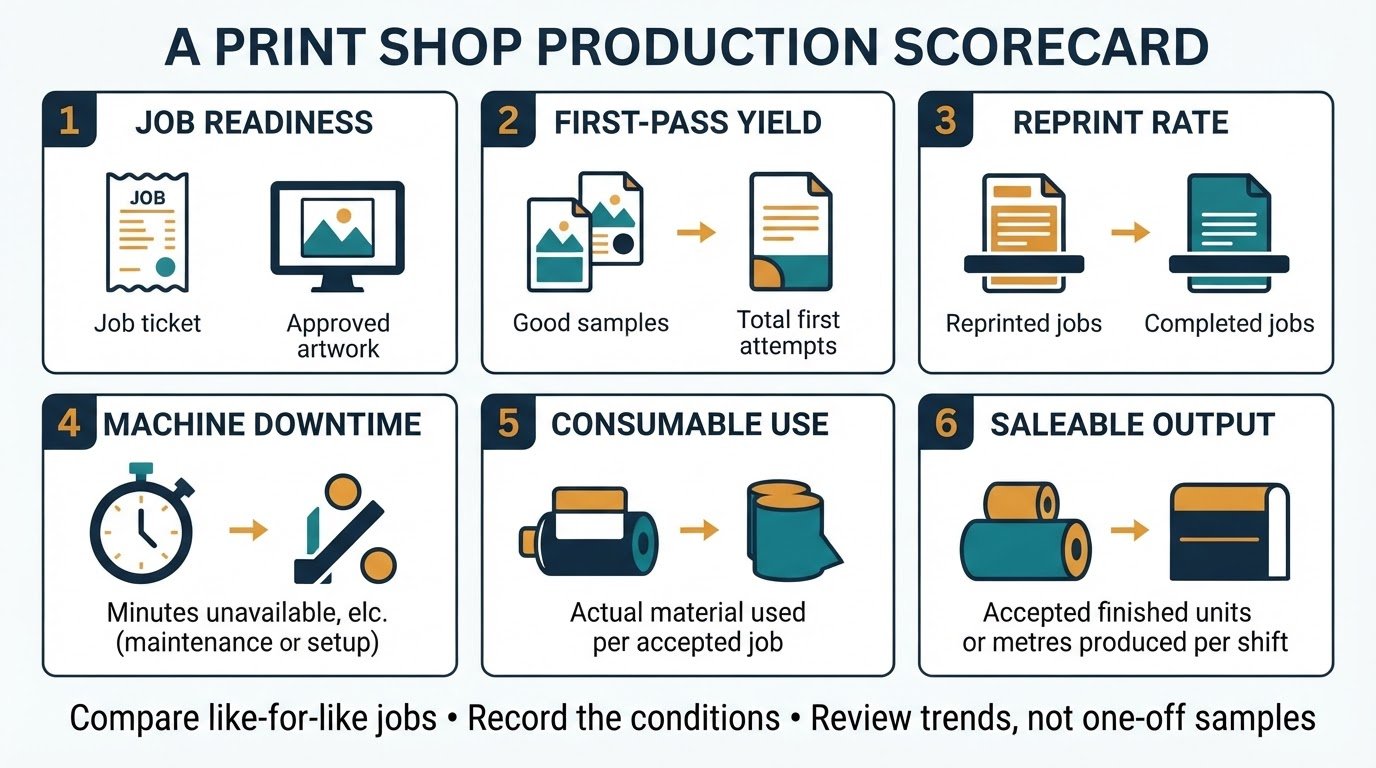
A simple weekly review for an Indian print shop
- Choose a fixed reporting period and include every production shift.
- Group jobs by process and comparable substrate or application.
- Review first-pass yield, reprint rate, unplanned downtime, material use and accepted output.
- Identify the largest repeat cause of lost output.
- Assign one corrective action with an owner and due date.
- Run a follow-up sample under recorded conditions and compare it with the previous like-for-like job.
A spreadsheet is enough to begin.
The key is consistent definitions and honest recording. Do not set a universal target from another printer’s brochure. Establish a baseline from your own accepted jobs, then improve one constraint at a time.
Choosing equipment with production data in mind
When comparing equipment, ask the supplier to demonstrate a representative job and record the complete route from file preparation to finished output.
Confirm:
- What is included in the machine configuration.
- Which finishing steps are separate.
- What maintenance tasks are operator responsibilities.
- What service response arrangements are written into the quotation.
- Whether the demonstration uses your actual substrate and application.
Explore the ProlificGeeks printing machine catalogue to compare DTF, DTG, UV, UV DTF and sublimation categories.
Use the printing business resources for planning and support preparation.
For a machine configuration or production discussion, visit ProlificGeeks contact.
Confirm current specifications, availability, price, installation scope and service terms for the exact model before making a purchase decision.
Frequently asked questions
What is the most useful KPI for a small DTF printing business?
Start with first-pass yield and reprint reasons, alongside saleable output per shift. These reveal whether printed material is becoming accepted, finished work.
Should I measure printer speed or finished output?
Measure both, but use finished accepted output for production planning. Printer speed describes one stage under stated settings; it does not include artwork preparation, setup, curing, pressing, inspection, rework or packing.
How do I compare two different printing technologies fairly?
Use the same product requirement and include all required process stages, consumables, labour, finishing, rejects and maintenance assumptions.
How many days of production data do I need?
There is no universal minimum. Record enough representative shifts and job types to include normal variation, material changes and routine maintenance.
Does a production dashboard require expensive software?
No. A controlled spreadsheet and numbered job tickets can establish the baseline. Consider dedicated production software only when multiple machines, operators, shifts or order channels make manual reconciliation unreliable.
Build the habit before buying more capacity
Before investing in another printer, measure where accepted work is being lost today.
A clear job ticket, first-pass yield, reprint log, downtime record and cost per accepted unit can show whether the next improvement should be training, artwork preparation, material control, finishing capacity, maintenance or a different machine configuration.
Need help reviewing your printing workflow or machine requirement?
Share the process, substrate, job size and current bottleneck with ProlificGeeks. We can help you frame the questions to check before selecting equipment.
Sources and further reading
- PRESSIdeas — India digital printing outlook 2026–27, 12 September 2026
- Textile Insights — The future of digital printing, 18 November 2026
- Specialist Printing Worldwide / Keypoint Intelligence — Digital printing reshaping India’s apparel market, 17 February 2026
Editorial note: Industry interviews and market commentary are attributed to their publishers and speakers. The KPI definitions and sample calculations above are operational guidance, not measured results from ProlificGeeks customers or claims about a particular printer model.